Journal
Free AI Visibility Audit Tool: What It Checks
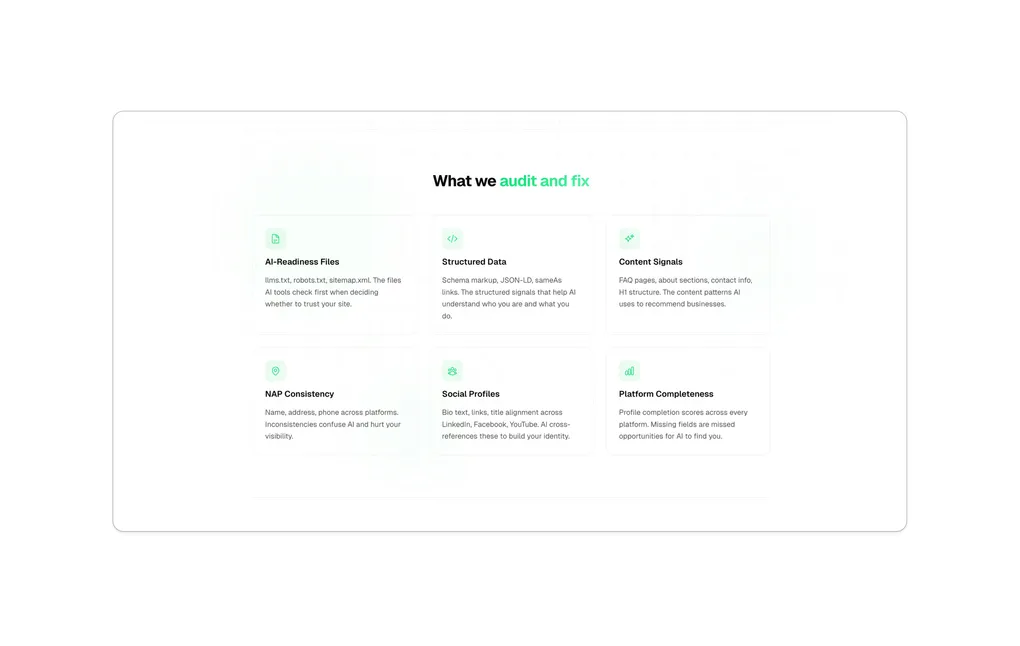
People are no longer just Googling for service providers. They’re asking ChatGPT. They’re asking Claude. They’re asking Perplexity and Gemini. And when they do, AI pulls from structured data, website files, and cross-platform consistency to decide who gets recommended.
Most local businesses have no idea whether AI can find them. I built a tool that tells you in under a couple of minutes.
The AI Visibility Audit Tool is live at connectmy.tech. Run your free audit there — current pricing and limits are on the tool page. You enter your website and social links, and it scans your entire online presence across six areas that matter for AI discoverability. You get a score out of 100, a breakdown by category, and specific recommendations you can act on today.
This post breaks down exactly what the tool checks, why each area matters, and what you can do about your score.
Why Did I Build This Tool?
I’ve been deep in AI discoverability work through ConnectMyTech, the AI and automation consulting company I founded. I’ve audited businesses manually, implemented fixes for clients, and built my own website to be AI discoverable from the ground up. Every time I worked with a new business, I was doing the same checks by hand. Same six areas. Same findings. Same gaps.
So I turned the process into a tool. Now anyone can check their AI visibility without hiring someone or learning what schema markup means.
Who Is AI Discoverability Tool For?
If you run a local business or work as a consultant or solopreneur, this tool is for you. Realtors, mortgage brokers, coaches, freelancers, anyone who relies on being found and recommended.
If you’ve ever wondered “does ChatGPT know I exist?”, this gives you a real answer. Not a guess. A score based on what AI tools actually look for.
How Does the AI Visibility Audit Work?
You go to connectmy.tech and enter your details. Your name and website URL are required. You can also add your Google Business Profile link, LinkedIn, Instagram, Facebook, and YouTube for a deeper audit.
Hit submit. The tool runs six checks in real time. You watch each one complete on a live progress screen.
When all six checks finish, AI synthesizes your results into a prioritized report. The whole thing takes 30 to 90 seconds.
What Score Will I Get?
Your overall score is out of 100, and the tool sorts it into visibility bands:
AI-Ready. Your online presence is well structured for AI tools. Fine-tuning will make it exceptional.
Partially Visible. AI tools can find you, but they might miss key details or get things wrong about you.
Low Visibility. AI tools struggle to find you or describe you accurately. There’s real work to do here.
Not Discoverable. AI tools cannot reliably find or identify you. This needs immediate attention.
The exact band cutoffs live on the tool itself, so check your result at connectmy.tech for where you land.
Most small businesses score low today. That’s not a failure. It’s the reality of a landscape that’s shifting fast. The businesses that fix this early tend to get found first.
What Does the Tool Check? The Six Audit Areas
The audit covers six areas, each weighted based on how much impact it has on AI discoverability. Here’s what they are and why they matter.
Area 1: AI-Readiness Files (20% of your score)
This checks whether your website has the files AI tools rely on to understand your business.
llms.txt is a new standard. It’s a plain text file at the root of your website that tells AI tools who you are, what you do, and which pages matter most. Think of it as your elevator pitch for AI. Most websites don’t have one. I wrote about this in detail in my AI discoverability guide.
robots.txt controls which crawlers can access your site. Many websites accidentally block AI crawlers like GPTBot (OpenAI), ClaudeBot (Anthropic), and PerplexityBot. If you’re blocking them, you’re invisible to those AI systems.
sitemap.xml is the roadmap of your website. It helps AI crawlers find all your pages, not just the ones linked from your homepage.
llms-full.txt is the extended version of llms.txt. More detail, more context, more data for AI to work with.
The tool checks for each of these files and tells you exactly what’s present, what’s missing, and what to add. Want the deep how on writing these yourself? See how I made my website AI discoverable.
Area 2: Structured Data (20% of your score)
Structured data is invisible code on your website that tells AI exactly what your content means. Not what it looks like. What it means.
The tool checks for:
Person or Organization schema. Does your website identify you or your business in a format AI tools understand? This is the most important piece of structured data for AI discoverability.
sameAs links. Are your social profiles (LinkedIn, Instagram, Facebook, YouTube) connected to your website in a way AI can follow? These links help AI build a complete picture of who you are across the internet.
FAQ schema. Do your frequently asked questions use structured markup that AI can read directly and cite in answers?
LocalBusiness schema. If you serve a local area, is your location, service area, and business category structured for AI to understand?
Most small business websites have zero structured data. Adding it is one of the highest-impact changes you can make.
Area 3: Content Signals (15% of your score)
AI tools need clear, readable content to understand your business. This area checks whether your website communicates effectively to both humans and machines.
The tool looks for:
FAQ content. AI loves Q&A format because it mirrors how people ask questions. If you have a FAQ page or section, AI can match questions to answers directly.
An About page with real substance. Not a one-liner. At least 100 words explaining who you are and what you do. AI uses About pages as a primary source for understanding businesses and people.
A clear homepage headline. Your H1 should describe your business, not just show your name or a vague slogan. “Mortgage Broker in Victoria, BC” is far more useful to AI than “Welcome to Our Website.”
Visible contact information. Your phone number and address should be in the actual HTML, not buried in an image or a Google Maps embed. AI can’t read images.
Author attribution. If you publish articles or blog posts, they should have an author name. This helps AI connect your content to your identity.
Area 4: NAP Consistency (20% of your score)
NAP stands for Name, Address, and Phone. This is the consistency check. AI cross-references your business information across multiple platforms. If your details don’t match, AI loses confidence in recommending you.
The tool compares your business information across:
- Your website (footer, contact page, embedded schema)
- Your Google Business Profile
- Your LinkedIn profile
- Your other social media pages
It normalizes phone numbers (so “+1-250-555-0100” and “(250) 555-0100” are recognized as the same number), website URLs (www vs. non-www), and address formats before comparing.
Mismatches get flagged with specific recommendations for what to fix and where.
Why Does NAP Consistency Matter for AI Recommendations?
AI tools are cautious. They don’t want to recommend a business and get the phone number wrong. If your website says one phone number and your Google listing says another, AI is less likely to cite either one. Consistency signals reliability.
This isn’t just about AI. Google uses NAP consistency for local search rankings too. Fixing this helps you on both fronts.
Area 5: Social Bio Consistency (15% of your score)
Your social media profiles are part of your AI footprint. AI tools read your LinkedIn bio, your Instagram bio, your Facebook page, and your YouTube channel. If these tell different stories, AI struggles to build a clear picture of who you are.
The tool checks three things:
Website links. Does every social profile link back to your website? If your LinkedIn doesn’t link to your site, AI might not connect them.
Professional title. Is your title consistent across platforms? “Real Estate Agent” on LinkedIn but “Realtor” on Instagram and blank on Facebook creates confusion for AI.
Empty bios. Having a claimed profile with no bio is worse than not having the profile at all. It signals inactivity.
Area 6: Platform Completeness (10% of your score)
Having a Google Business Profile, a LinkedIn account, or an Instagram page is not enough. If it’s half-filled, it’s hurting you more than helping. AI tools factor profile completeness into their recommendations.
The tool checks each platform for specific signals:
Google Business Profile: category set, hours listed, description written, photos uploaded, recent posts published.
LinkedIn: headline present, About section written, website linked, custom URL set.
Instagram: bio written, website linked, profile photo set.
Facebook: about section filled, website and phone listed.
YouTube: channel description present, website in links section.
A complete profile shows AI (and clients) that you’re active and established. An incomplete one gets skipped.
What Happens After I Get My Score?
You get three things:
1. A full score breakdown. Each of the six areas is scored individually so you can see exactly where you’re strong and where you’re weak. Every finding is expandable with details on what was checked and what was found.
2. Prioritized recommendations. Five specific actions, written in plain language. The first two are Quick Wins you can do in under an hour. The other three are This Week items that take a bit more effort. These aren’t generic advice. They’re specific to your results.
3. A save option. Enter your email and get a PDF copy of the full report sent to your inbox.
Can I Fix These Issues Myself?
Some of them, yes.
Creating an llms.txt file is something you can do in 30 minutes with a text editor. Updating your social bios takes 10 minutes per platform. Filling out your Google Business Profile is straightforward once you know what’s missing.
Other fixes are more technical. Adding schema markup to your website requires editing HTML or working with a developer. Fixing robots.txt depends on your hosting platform. Implementing structured data across your site is a real project.
That’s where ConnectMyTech comes in. If you want it handled, I offer a done-for-you service that takes your audit results and implements every fix. You get a before-and-after report showing the improvement.
What Services Does ConnectMyTech Offer?
ConnectMyTech is the AI and automation consulting company I founded. Three core services:
AI Discoverability Audit + Fix. The full version of what the free tool shows you. I implement the fixes: llms.txt created and deployed, schema markup added, structured data cleaned up, NAP consistency resolved. You get a detailed report with before-and-after scores.
Google Business Profile Optimization. Your GBP gets more attention than your website. I audit it, rewrite your description, build out your services section, publish initial posts, and optionally manage it monthly.
Zapier Automation. I connect the tools your business already uses to eliminate manual work. Lead follow-ups, booking onboarding, review requests. Starter packages with defined workflows plus custom add-ons.
There’s also a monthly retainer that covers all three on an ongoing basis. Details at connectmy.tech.
This Tool Is in Beta. I Need Your Feedback.
I’m being upfront about this. The AI Visibility Audit Tool is in beta. It’s live, it works, and the checks are real. But I’m actively improving it based on real-world usage.
If you run an audit, I want to hear from you:
- Was the score accurate to how you’d rate your own AI presence?
- Were the recommendations specific enough to act on?
- Did any module fail or produce unexpected results?
- What would make this tool more useful for you?
Hit me up on LinkedIn or through my contact page. Every piece of feedback shapes the next version.
I’m building this tool in public. The goal is to make it the most useful free AI discoverability resource available. But it only gets there with real feedback from real users.
How Can I Help You Implement All of This?
If your score is lower than you’d like and the recommendations feel overwhelming, here’s how I can help:
Option 1: Use the free recommendations. The audit gives you enough to start fixing things yourself. The Quick Wins are designed to be done in under an hour with no technical background.
Option 2: Book a free AI Presence Review. I’ll walk through your results with you on a call, explain what matters most for your specific business, and outline a fix plan. No commitment. Book a call here.
Option 3: Done-for-you implementation. I handle everything. llms.txt, schema markup, structured data, NAP cleanup, GBP optimization, automation setup. You get a report showing what changed and how your score improved. Available as a one-time project or part of the ConnectMyTech retainer.
Frequently Asked Questions
What is AI discoverability? AI discoverability is the practice of making your business visible and understandable to AI systems like ChatGPT, Claude, Perplexity, and Google AI Overviews. It goes beyond traditional SEO by focusing on structured data, machine-readable files, and cross-platform consistency so AI tools can find, understand, and recommend your business.
What is the AI Visibility Audit Tool? It’s a free tool at connectmy.tech that scans your website and social profiles across six areas that affect how AI tools see your business. You get a score out of 100, a breakdown by category, and specific recommendations to improve your visibility.
How much does the AI Visibility Audit cost? Your first audit is free. See connectmy.tech for current pricing and limits.
What is an llms.txt file? An llms.txt file is a plain text file placed at the root of your website (yourdomain.com/llms.txt) that gives AI tools a structured summary of your business. It includes your name, description, services, key pages, and contact information. It’s becoming the new standard for AI discoverability, similar to what robots.txt did for search engines.
What is structured data and why does it matter? Structured data is invisible code (usually JSON-LD) embedded in your website that tells AI systems exactly what your content means. For example, a Person schema tells AI “this is a person named [name] who does [profession] in [city]” in a machine-readable format. Without it, AI has to guess from your paragraph text.
What is NAP consistency? NAP stands for Name, Address, and Phone number. NAP consistency means your business details are identical across your website, Google Business Profile, LinkedIn, and other platforms. AI tools cross-reference these sources. Inconsistencies reduce AI’s confidence in recommending you.
Is the audit tool accurate? The tool checks real technical signals that AI systems use. It fetches your actual website files, parses your HTML for structured data, and compares your business information across platforms. The scoring is based on the same factors I check when doing manual audits for clients.
Can I run the audit more than once? Yes. See connectmy.tech for current pricing and limits.
What if my score is low? A low score means there’s work to do, but it also means there’s a big opportunity. Most local businesses score low today. Fixing the gaps identified in your report can move your score significantly, and the businesses that do this first have a real advantage.
Do I need a developer to fix the issues? Some fixes are simple enough to do yourself, like creating an llms.txt file, updating social bios, or completing your Google Business Profile. Technical fixes like adding schema markup or modifying robots.txt may require a developer or someone familiar with your website platform. ConnectMyTech offers done-for-you implementation for all of it.
How can I give feedback on the tool? Hit me up on LinkedIn or reach out through my contact page. The tool is in beta and I’m actively improving it. Your feedback directly shapes what gets built next.