Journal
Mastering CLAUDE.md for Multi-Project AI Workflows
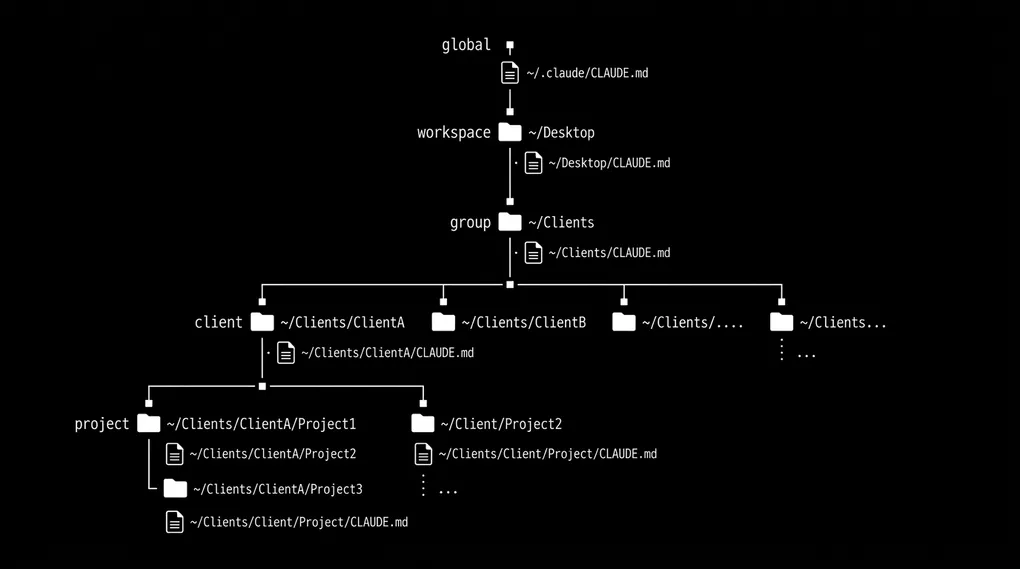
If you use Claude Code across multiple projects, you’ve probably noticed something: you keep repeating yourself. Every new session, you re-explain your preferences, your stack, your conventions. You lose context. You start from scratch.
The fix is understanding how CLAUDE.md files actually work — and structuring them so Claude already knows what you need before you type a single prompt.
This guide walks through the full hierarchy, from global config to project-specific instructions, with real examples you can adapt to any multi-project workflow.
How Does Claude Code Read Your Instructions?
When you launch Claude Code, it doesn’t just read one file. It walks up the directory tree from wherever you run claude, loading every CLAUDE.md it finds along the way (this lookup behavior is documented in Anthropic’s official memory docs).
You run claude here:
~/projects/acme-corp/dashboard-app/

Claude loads (bottom → top):
  ✓ ~/projects/acme-corp/dashboard-app/CLAUDE.md   ← project
  ✓ ~/projects/acme-corp/CLAUDE.md                  ← client (if exists)
  ✓ ~/projects/CLAUDE.md                            ← all projects
  ✓ ~/.claude/CLAUDE.md                             ← global personal
Every ancestor directory gets checked. Instructions merge together, with closer files taking priority over distant ones. This means you can layer your configuration like CSS — general rules at the top, specific overrides at the bottom.
The Full Directory Map
Here’s every location Claude Code looks for configuration, and what each one controls:
~/.claude/                                    ← GLOBAL (all projects)
├── CLAUDE.md                                 ← Your universal instructions
├── settings.json                             ← Global permissions & preferences
├── rules/                                    ← Path-scoped rules for all projects
│   └── *.md
├── skills/                                   ← Skills available everywhere
│   └── <skill-name>/
│       └── SKILL.md
└── commands/                                 ← Slash commands (legacy → use skills)
    └── *.md

~/projects/                                   ← WORKSPACE LEVEL
├── CLAUDE.md                                 ← Shared across all projects here

~/projects/acme-corp/                         ← CLIENT / GROUP LEVEL
├── CLAUDE.md                                 ← Rules for all Acme Corp work

~/projects/acme-corp/dashboard-app/           ← PROJECT LEVEL
├── CLAUDE.md                                 ← This project only
├── .claude/
│   ├── CLAUDE.md                             ← Alternative location (same effect)
│   ├── settings.json                         ← Project settings (shared via git)
│   ├── settings.local.json                   ← Your local overrides (gitignored)
│   ├── rules/                                ← Path-scoped rules
│   │   ├── frontend.md                       ← Only loads for frontend files
│   │   └── api.md                            ← Only loads for API files
│   └── skills/                               ← Project-specific skills
│       └── <skill-name>/
│           └── SKILL.md
└── .mcp.json                                 ← MCP server connections
Step 1: Create Your Global CLAUDE.md
This is the most impactful file you can create. It applies to every project you open with Claude Code.
Location: ~/.claude/CLAUDE.md
Put things here that are always true about how you work:
# Personal Preferences
- I'm a full-stack developer working with multiple clients
- Prefer TypeScript, React, Tailwind, Supabase
- Use pnpm as package manager
- Write concise commit messages in conventional format
- Prefer functional components over class components
- Always use absolute imports where configured
- Don't add comments unless the logic is non-obvious
Keep it under 200 lines. Every line costs context, so be specific and avoid filler.
Step 2: Set Up Group-Level Instructions
If you organize projects into groups — by client, team, or domain — add a CLAUDE.md at that level.
Location: ~/projects/CLAUDE.md or ~/projects/client-name/CLAUDE.md
# Client Projects
- Each subfolder is a different client engagement
- Never commit .env files or credentials
- Check for .env.example before creating .env
- Don't push to remote without asking
- All projects use git — commit frequently
- Respect existing code style in each project
This saves you from repeating “don’t push without asking” in every single project.
Step 3: Add Project-Level CLAUDE.md Files
Each project gets its own specific instructions. This is where you document the stack, build commands, architecture decisions, and anything unique.
Location: <project-root>/CLAUDE.md or <project-root>/.claude/CLAUDE.md
# Dashboard App

## Stack
- Next.js 14 (App Router)
- PostgreSQL + Prisma
- Stripe API for payments
- Deployed on Vercel

## Commands
- `npm run dev` — local development
- `npm run build` — production build
- `npm run db:migrate` — run migrations

## Architecture
- `/app` — Next.js routes and layouts
- `/lib` — shared utilities and API clients
- `/components` — React components (colocated with routes)

## Important
- API keys are in .env.local (never commit)
- The Stripe client is in /lib/stripe.ts
- All database queries go through /lib/db.ts
Step 4: Use Path-Scoped Rules for Precision
Rules let you give Claude different instructions for different parts of your codebase. They live in .claude/rules/ and can target specific file patterns using frontmatter.
.claude/rules/
├── general.md          ← Always loaded
├── frontend.md         ← Only for frontend files
├── api.md              ← Only for API routes
└── tests.md            ← Only for test files
Example rule with path scoping:
---
paths:
  - "src/components/**/*.tsx"
  - "src/app/**/*.tsx"
---

# Frontend Rules
- Use Tailwind for all styling, no CSS modules
- All components must be functional with TypeScript props interface
- Use `cn()` utility for conditional classes
And for tests:
---
paths:
  - "**/*.test.ts"
  - "**/*.spec.ts"
---

# Testing Rules
- Use Vitest, not Jest
- Hit the real database, don't mock it
- Each test file should be self-contained
Rules only load when Claude is working on files that match the pattern. This keeps context lean and instructions relevant.
Step 5: Set Up Skills for Reusable Workflows
Skills are reusable prompts that Claude can invoke automatically or you can trigger with /skill-name. They’re the evolution of the older commands/ system.
Global skills (available in all projects):
~/.claude/skills/
├── deploy/
│   ├── SKILL.md            ← Instructions for deployment workflow
│   └── scripts/
│       └── pre-deploy.sh   ← Helper script
├── code-review/
│   └── SKILL.md            ← How to review code
└── blog-writer/
    ├── SKILL.md            ← Blog writing workflow
    └── templates/
        └── post.md         ← Blog post template
Project skills (this project only):
<project>/.claude/skills/
└── database-migration/
    ├── SKILL.md            ← How to create migrations for this project
    └── examples/
        └── sample.sql      ← Reference migration
A skill’s SKILL.md looks like this:
---
name: deploy
description: Deploy the current project to production
---

# Deploy Workflow

1. Run the test suite: `pnpm test`
2. Build the project: `pnpm build`
3. Check for uncommitted changes
4. Push to main branch
5. Verify deployment on Vercel dashboard
Which CLAUDE.md File Takes Priority?
When instructions conflict, Claude follows a clear precedence:
┌─────────────────────────────────┐
│  Project (.claude/settings.json) │  ← Highest priority
├─────────────────────────────────┤
│  Local (.claude/settings.local)  │
├─────────────────────────────────┤
│  Project CLAUDE.md               │
├─────────────────────────────────┤
│  Parent directory CLAUDE.md      │
├─────────────────────────────────┤
│  ...ancestor directories...      │
├─────────────────────────────────┤
│  User (~/.claude/CLAUDE.md)      │  ← Lowest priority
└─────────────────────────────────┘
Project-level instructions always win. If your global CLAUDE.md says “use pnpm” but a project CLAUDE.md says “use npm”, npm wins for that project.
Settings Files: The Other Half
CLAUDE.md handles instructions. Settings files handle permissions and behavior.
| File | Scope | Shared? |
|---|---|---|
~/.claude/settings.json | All your projects | No |
.claude/settings.json | This project, all collaborators | Yes (git) |
.claude/settings.local.json | This project, only you | No (gitignored) |
Example project settings:
{
  "permissions": {
    "allow": ["Bash", "Read", "Write", "Edit"],
    "deny": ["WebFetch"]
  }
}
MCP Servers: External Tool Connections
MCP servers connect Claude to external tools (databases, APIs, project management). They follow the same layering:
| File | Scope |
|---|---|
~/.claude.json | Global MCP servers (available everywhere) |
.mcp.json | Project-specific servers (shared via git) |
Real-World Example: A Freelancer’s Setup
Here’s how a developer working across multiple clients might structure things:
~/.claude/
├── CLAUDE.md                    "I use TS/React/Tailwind, prefer pnpm..."
├── skills/
│   ├── deploy/                  Deployment workflow
│   └── code-review/             Code review checklist
└── settings.json                Global permissions

~/projects/
├── CLAUDE.md                    "All projects use git, don't push without asking"
├── acme-corp/
│   ├── CLAUDE.md                "Acme uses PostgreSQL, deploys to AWS"
│   ├── dashboard-app/
│   │   └── CLAUDE.md            "Next.js, Prisma, Stripe..."
│   └── marketing-site/
│       └── CLAUDE.md            "Astro, content collections..."
├── startup-xyz/
│   └── mobile-app/
│       └── CLAUDE.md            "React Native, Expo, Firebase..."
└── personal/
    └── portfolio/
        └── CLAUDE.md            "Astro 5, blog posts in markdown..."
Each layer adds context without repeating what the layers above already provide. When you open Claude Code in dashboard-app/, it already knows you prefer TypeScript (global), Acme uses PostgreSQL (client), and this specific project uses Next.js with Stripe (project).
Quick Reference: What Goes Where
| Level | Location | Put here |
|---|---|---|
| Global | ~/.claude/CLAUDE.md | Your identity, universal preferences, default stack |
| Workspace | ~/projects/CLAUDE.md | Broad rules for all projects in this directory |
| Group | ~/projects/acme-corp/CLAUDE.md | Shared client or team conventions |
| Project | ~/projects/acme-corp/app/CLAUDE.md | Stack, architecture, build commands |
| Rules | .claude/rules/*.md | Path-scoped instructions (frontend vs backend) |
| Skills | .claude/skills/*/SKILL.md | Reusable workflows and automations |
| Settings | .claude/settings.json | Permissions, tool access, behavior |
Why Keep Every CLAUDE.md File Under 200 Lines?
Every CLAUDE.md file costs context. Claude reads all of them at session start, and every token spent on instructions is a token not spent on your actual task.
Keep each file under 200 lines. Be specific (“use 2-space indentation”) rather than vague (“format code properly”). Delete instructions that can be derived from the code itself.
The best CLAUDE.md files are short, precise, and layered. Set it up once, and every Claude Code session starts with the full picture of who you are, what you’re building, and how you want it done.