Journal
What a Real AI Employee Does After 5 Weeks
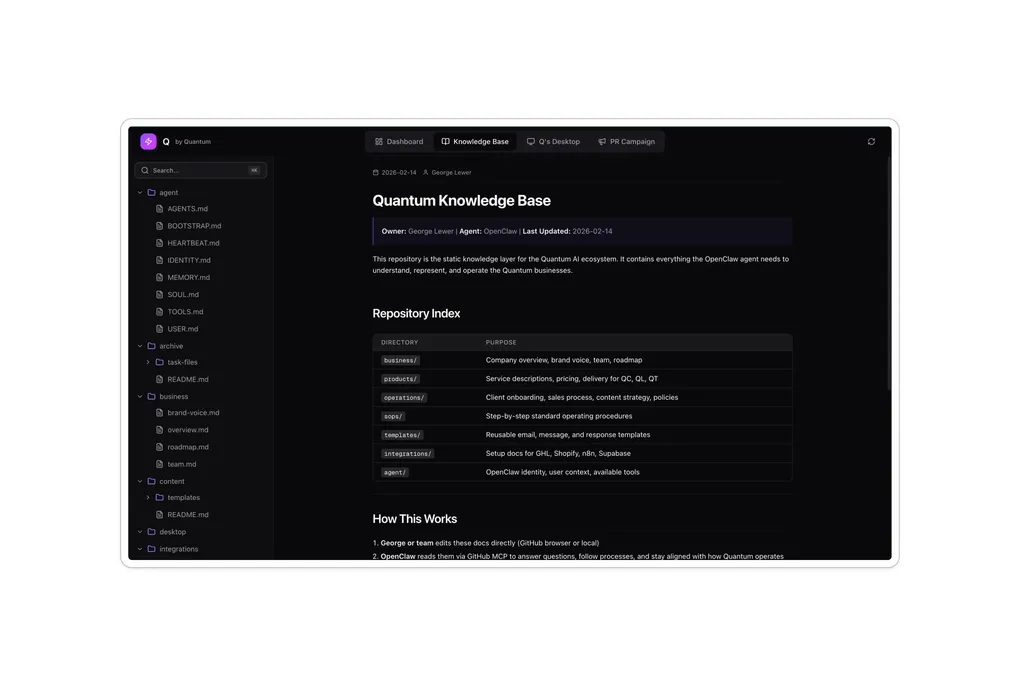
Five weeks ago, I wrote about deploying OpenClaw for a client. The agent failed on its very first message. It had no data, no context, no understanding of the business.
That post ended with a lesson: the knowledge base is the product, the agent is just the interface.
This post is about what happened after we built that knowledge base and actually started using Q every single day.
What Changed Between Day One and Week Five?
The client is George Lewer, founder of Quantum Club. On day one, Q was an empty shell. Connected to tools but blind to the business. On week five, George messages Q on Slack like a team member. His operations manager Elana messages Q when she has CRM questions. I message Q on Telegram when I need to debug an automation or brainstorm a solution.
The shift in one sentence: Q went from a tool we were testing to an employee we rely on.
The difference was not the model, the framework, or the integrations. It was the knowledge base. Every week, we added more context. More process documentation. More decision-making logic. More business data. And every week, Q got noticeably smarter.
Key takeaway: The more structured context you give an AI agent, the more useful it becomes. This is not a one-time setup. It is an ongoing investment that compounds over time.
What Tools Does Q Connect To?
Q is not a standalone chatbot. It is wired into the tools George’s team already uses, running on infrastructure we control.
Active integrations:
| Category | Tool | What Q Uses It For |
|---|---|---|
| Knowledge | GitHub | Knowledge base and code repos (qc-knowledge-base) |
| CRM | GoHighLevel | Pipeline management, lead tracking, client data |
| Communication | Slack | Team communication (#q-bot channel) |
| Communication | Telegram | Direct messaging with Shahab |
| Meetings | Fireflies | Meeting transcripts and action items |
| Voice | OpenAI Whisper | Voice note transcription (ready, not yet active) |
| Tasks | Asana | Task and project management |
| Search | Brave Search API | Primary web search |
| Search | Serper.dev | Fallback web search |
| AI Models | OpenRouter | AI model management (one key for all models) |
Infrastructure:
| Layer | Tool | Purpose |
|---|---|---|
| Runtime | Hostinger VPS | OpenClaw runtime environment |
| Security | Tailscale VPN | Secure private networking |
| Storage | Google Drive | Document storage and sharing |
12 integrations. 3 infrastructure layers. One AI employee.
The important thing is that Q connects to tools the team was already using. We did not ask George to change his workflow. We plugged Q into the workflow that already existed. This is Systems Before Tools in action.
What Does Q Actually Do Every Day?
After five weeks of daily use, three use cases stand out as genuine time savers.
CRM Debugging - Finding Problems Without Digging Through Data
GoHighLevel runs automations for lead follow-up, client onboarding, and email sequences. When something breaks, you normally have to dig through the CRM manually to figure out what happened.
Last week, an automation fired twice and sent a wrong email to a client. Instead of spending an hour clicking through GHL’s interface, I messaged Q:
“What happened with this contact? Why did they get two emails?”
Q pulled the full history. Every trigger that fired. Every email sent with timestamps. The automation source for each one. It laid it all out in simple language without us having to navigate the CRM ourselves.
Q could not identify the root cause on its own. But it did something just as valuable. It gave me a clear picture of everything that happened, fast. Then it stayed by my side as I brainstormed solutions, pointing out automation workflow patterns I had not noticed before.
Time saved: What would have been 30-60 minutes of CRM archaeology became a 15-minute conversation.
The pattern: Q does not replace your judgment. It replaces the tedious work of gathering and organizing information so you can make better decisions faster.
End-of-Day Business Brief - The 30-Minute Task George Never Had Time For
George’s day is packed. Coaching calls, client check-ins, content creation, business development. By the end of the day, he should be reviewing what happened and planning tomorrow. That review takes 30 minutes when you do it properly. Most days, George could not find those 30 minutes.
Now Q does it automatically. Every evening, scheduled to George’s timezone, Q pulls together:
- Meeting summaries from Fireflies transcripts - what was discussed, what was decided, action items
- CRM activity from GoHighLevel - new leads, pipeline changes, client interactions
- Task status from Asana - what got completed, what is overdue, what is coming up
George gets a single brief. One message on Slack. Everything that matters from the day, organized and ready to review.
Time saved: 30 minutes per day. Over 150 hours per year on one task.
Deep Research - Building a Full Trading Course in a Week
This one surprised us. We gave Q a research task: build a fundamental and technical analysis course for traders. Not a summary. Not an outline. A full course with multiple layers of research.
We gave Q a timeframe of one week to run in the background. It gathered information, organized it against Quantum Club’s mission and brand voice (because the knowledge base had all of that documented), and assembled a complete course.
George is now reviewing the content before publishing. His reaction: the material is well connected with the mission and voice of the brand. It reads like something George would have written himself.
This is why the knowledge base is the product. Any AI can write a trading course. Only an AI with deep business context can write one that sounds like your brand and aligns with your mission.
Key takeaway: Give an AI agent structured context about your business, your voice, and your mission. Then give it time. The results compound.
What Happens When Your AI Employee Forgets?
This was our biggest frustration. We would have a conversation with Q, fix something, agree on an approach, and the next day Q had no memory of it. Decisions made together were forgotten by morning.
OpenClaw has a built-in memory system. It logs daily memories and updates a master memory file once a day during scheduled heartbeats. On paper, it works. In practice, important context was falling through the cracks.
The fix was simple but important. We switched Q to a proactive memory system:
- Q now updates memory during conversations, not just during scheduled heartbeats
- Daily memory files are created in real time, capturing context as it happens
- Q asks “Should I remember this?” for borderline items instead of guessing
- All memory data lives on GitHub in the knowledge base repo - version controlled, searchable, persistent
This is the kind of problem you only discover through daily use. No tutorial covers it. No deployment guide warns you about it. You find it by treating the agent like a real team member and noticing when it drops the ball.
The lesson: Memory is not a feature you configure once. It is a system you design, test, and improve based on real usage patterns.
What Are We Building Next?
Q works. It saves real time on real tasks. But we are not done.
The next focus is making Q smarter by improving two foundations:
- Better knowledge base architecture - researching more effective ways to structure business context so Q retrieves and reasons over it more accurately
- Better memory systems - exploring approaches beyond simple file-based memory for long-term context, contradictions, and evolving information
The integration stack is solid. The use cases are proven. Now the work is in the foundation underneath. The data layer that makes everything else possible.
It comes back to the same principle from the original deployment post. Five weeks in, that is more true than ever.
If you are a business owner sitting on processes that eat 30 minutes here, an hour there, scattered across tools your team already uses - that is exactly what an AI employee is built for. Not replacing your team. Replacing the tedious work that keeps your team from doing what they are actually good at.
If you want to see what an AI employee could look like for your business, reach out.
Keep Reading
- I Deployed OpenClaw for a Client. Here’s What Matters. - the full story of the original deployment and why the knowledge base is the product
- Why the Best AI Agent Builders Are Not Developers - the Agent Maestro role and how it applies to managing AI employees
- Systems Before Tools - the framework behind every system I build